How to Choose and Use the GODESON Digital Caliper for Precision Measurements
In the world of precision tools, the GODESON Digital Caliper stands out as an essential instrument for anyone involved in detailed measurements, from hobbyists to professionals. This guide will walk you through everything you need to know about selecting and utilizing the GODESON Digital Caliper effectively, ensuring you get accurate results every time. Whether you're measuring components for woodworking, metalworking, or engineering projects, understanding this tool will elevate your work.
Understanding the Basics of the GODESON Digital Caliper
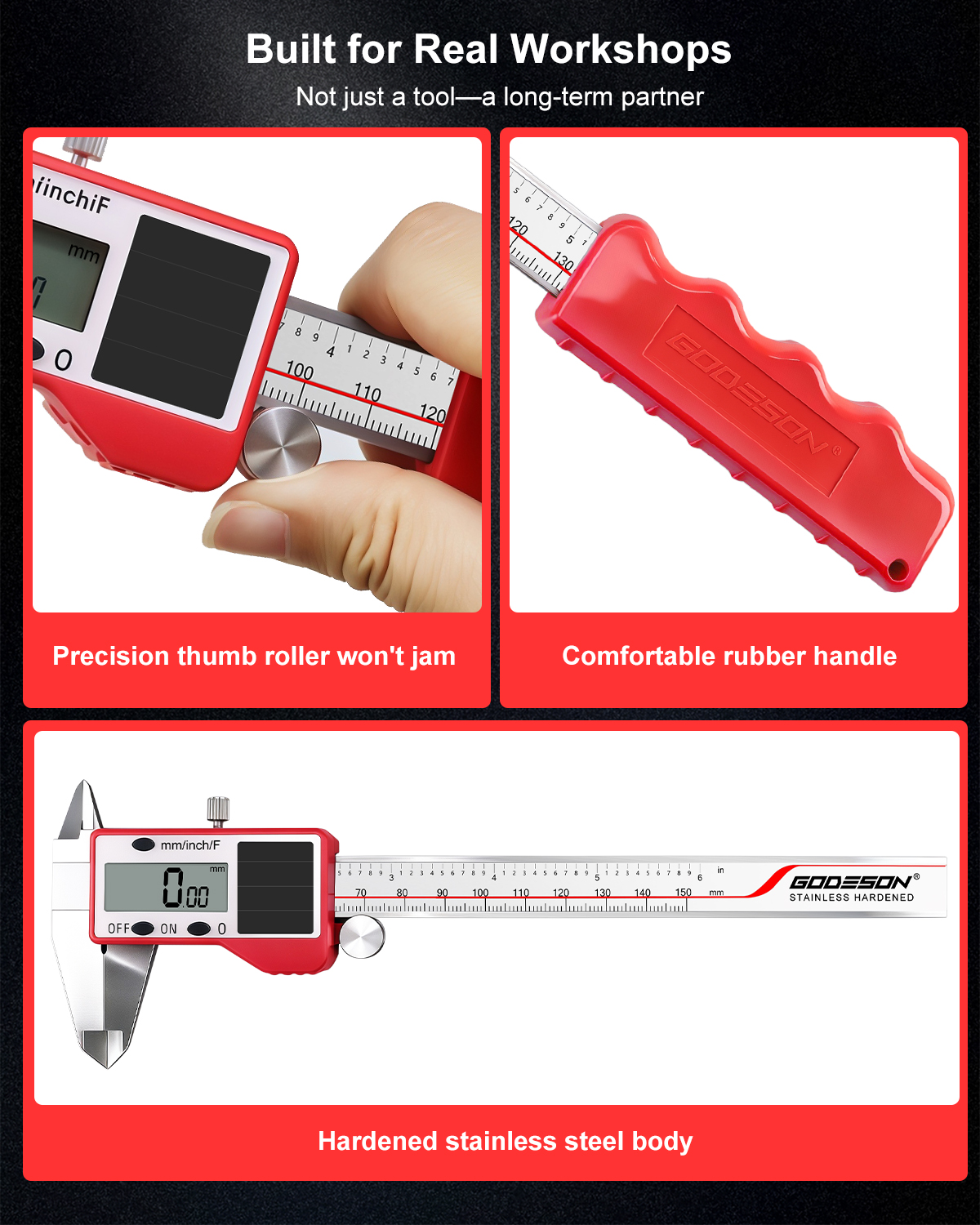
Before diving into usage, it's important to grasp what makes the GODESON Digital Caliper a top choice. This rechargeable model features a robust stainless steel construction that guarantees durability and resistance to wear. The GODESON Digital Caliper is designed with a measuring range of 0-150mm or 6 inches, making it versatile for a variety of tasks. Its IP54 rating means it's protected against dust and water spray, so you can use it in less-than-ideal workshop conditions without worry.
The easy-to-read LCD display is a highlight, allowing you to switch seamlessly between millimeters, inches, and fractions. This flexibility is crucial for professionals who need to meet specific standards. Additionally, the zero-setting function lets you take differential measurements effortlessly, saving time and reducing errors. With its ergonomic red handle, the GODESON Digital Caliper provides a comfortable grip, even during extended use sessions.
Unboxing and Initial Setup of Your GODESON Digital Caliper
Getting started with the GODESON Digital Caliper is straightforward. Upon unboxing, you'll find the caliper itself, a USB-C charging cable, and a sturdy red storage case. The inclusion of a rechargeable battery via USB-C is a game-changer, as it eliminates the hassle of replacing disposable batteries frequently. Begin by charging the device fully using the provided cable; this ensures it's powered up and ready for immediate use.
Once charged, power on the GODESON Digital Caliper by sliding the power switch. Familiarize yourself with the buttons: the mode button switches between measurement units, while the zero button resets the display for relative measurements. Calibrate it by closing the jaws and ensuring the display reads zero. If it doesn't, use the fine adjustment wheel to align it precisely. This initial setup is vital for maintaining the accuracy that the GODESON Digital Caliper is known for.
Store the tool in its protective case when not in use to prevent damage and keep it portable for on-the-go jobs. Regular charging, about once a month if unused, will keep the battery in optimal condition.
Step-by-Step Guide to Measuring with the GODESON Digital Caliper
Using the GODESON Digital Caliper for inside, outside, and depth measurements is simple once you follow these steps. First, select the appropriate jaws: the external jaws for outer dimensions, internal jaws for inner ones, and the depth probe for thicknesses or depths.
To measure an external dimension, open the jaws wider than the object, place the object between them, and gently close the jaws using the rack slide. The GODESON Digital Caliper will display the measurement instantly on the LCD screen. For precision, rock the caliper slightly to find the maximum reading, ensuring the true size is captured. Switch units if needed using the mode button for your project's requirements.
For internal measurements, extend the internal jaws and insert them into the hole or space, then close them until they touch the sides. The zero-setting function is handy here—set zero at a known point and measure differences accurately. Depth measurement involves hooking the probe over the edge and extending it to the bottom surface, reading the value directly.
Always clean the jaws before and after use to avoid residue affecting readings. The GODESON Digital Caliper's stainless steel build makes it easy to wipe down, maintaining its IP54 protection over time.
Advanced Tips for Maximizing the GODESON Digital Caliper's Performance
To get the most out of your GODESON Digital Caliper, consider these advanced techniques. In professional settings like engineering or machining, pair it with a stable workbench to minimize vibrations that could skew readings. The ergonomic design helps, but steady hands are key for sub-millimeter accuracy.
For hobbyists in woodworking, use the fraction mode for imperial measurements common in that field. The GODESON Digital Caliper's versatility shines when measuring irregular shapes—combine external and differential readings to map complex parts. In metalworking, its dust resistance allows safe use near grinding operations, but always rinse it afterward to preserve the electronics.
Maintenance is straightforward: avoid extreme temperatures, as they can expand or contract the steel. Charge via USB-C regularly, and if the display dims, a quick recharge restores full functionality. If you encounter any inaccuracies, recalibrate against a known standard like a gauge block.
Integrate the GODESON Digital Caliper into your workflow by recording measurements digitally—its clear display makes note-taking easy. For teams, the portable case ensures it's always accessible, fostering collaborative precision work.
Common Mistakes to Avoid with the GODESON Digital Caliper
Even with a reliable tool like the GODESON Digital Caliper, errors can occur. One common pitfall is forcing the jaws, which can damage the mechanism or throw off calibration. Always use gentle pressure. Another issue is ignoring the battery level; the LCD might flicker, leading to misreads, so monitor the charge indicator.
Don't overlook environmental factors—the IP54 rating handles splashes, but submerging it isn't advised. Forgetting to zero the caliper before differential measurements is a frequent oversight that leads to compounded errors. Regularly check the jaws for burrs or wear, as the stainless steel is durable but not indestructible.
By avoiding these mistakes, you'll ensure the GODESON Digital Caliper remains a dependable tool, delivering consistent precision across all your projects.
Why the GODESON Digital Caliper is Ideal for Your Toolkit
The GODESON Digital Caliper combines innovation with practicality, making it indispensable for engineers, craftsmen, and hobbyists. Its rechargeable design, versatile measurements, and robust build set it apart, offering value without compromising on quality. Whether upgrading from manual calipers or starting fresh, this tool enhances efficiency and accuracy.
Investing in the GODESON Digital Caliper means embracing a future-proof approach to measurements. With its sleek red accents and professional performance, it's not just a tool—it's a partner in precision. Follow this guide, and you'll master its use, unlocking new possibilities in your work.